Managing Courses#
Courses are maintained separately for each catalog year. When you create or edit a course, you are generally working with the version of that course that belongs to a particular catalog year.
Opening the Course List#
From the Admin Console, locate the Data Entry section near the bottom of the page.
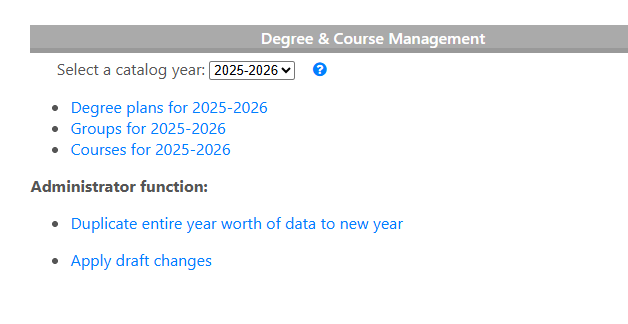
Select Courses for [catalog year] to open the course list for that catalog year.
From the course list, you can add new courses or select an existing course to edit it.
Adding a Course#
At the top of the course list, select Add a Course for [year].
The course edit form contains several fields.
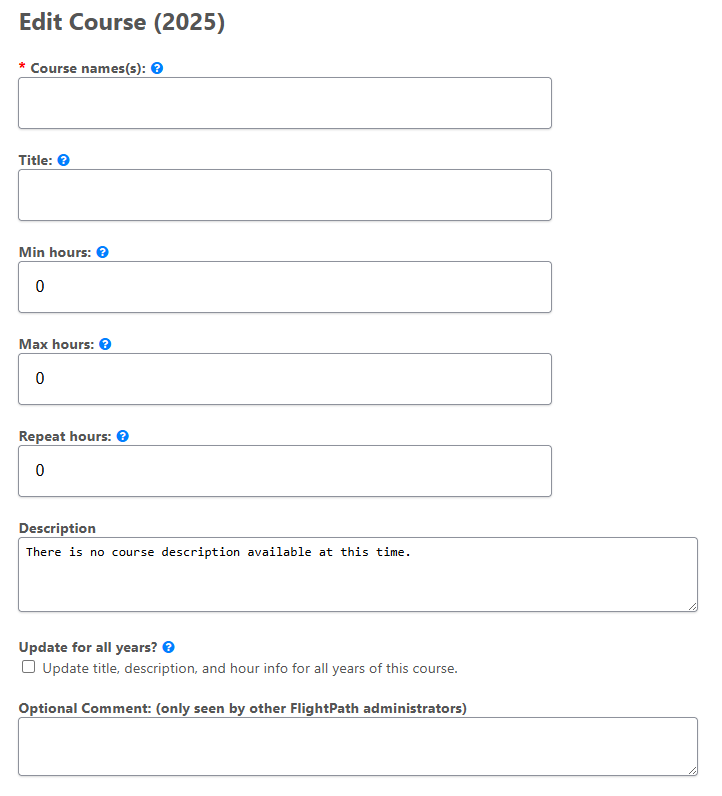
Below are the definitions and expected values of the fields you will see:
Course Name(s)#
Enter the subject and course number, separated by a space.
For example:
ART 101A course can have multiple names. This is useful for cross-listed courses or when a course has changed its name.
Separate multiple names with commas:
ART 101, ART 1001If an old course name should remain valid for students who previously took it, but should not normally appear in FlightPath’s course lists, add exclude to the old name:
ART 101 exclude, ART 1001In this example, FlightPath will recognize ART 101 when it appears on a student’s record, but will normally display the current name, ART 1001.
Title#
Enter the descriptive title of the course.
For example:
Introduction to ArtMinimum and Maximum Hours#
For a course with a fixed number of credit hours, the minimum and maximum hours should normally be the same.
For example, a three-hour course would have:
Minimum: 3
Maximum: 3
Variable-hour courses can use different values. For example, a guided study course that can be taken for 1 to 6 hours would use:
Minimum: 1
Maximum: 6
Repeat Hours#
Repeat Hours specifies the number of hours that a student can earn when a course may be repeated for credit.
For example, if a two-hour course can be repeated for credit up to three times, enter:
Minimum Hours: 2
Maximum Hours: 2
Repeat Hours: 6
For a course that cannot be repeated for credit, leave Repeat Hours at zero or set it to the course’s minimum hours, depending on how your institution’s course data is configured.
Description#
Enter the course description from your catalog.
Update for All Years?#
FlightPath can maintain different course titles, descriptions, and hour information for different catalog years.
When Update for All Years? is selected, FlightPath updates the available catalog years with the course information.
Use this option when the change is intended to apply across catalog years. If the information is specific to the selected catalog year, leave it unchecked.
Optional Comment#
The Optional Comment field is for notes to yourself or other FlightPath administrators.
These comments are not displayed to students, faculty, staff, or advisors who do not have access to the administrative data.
Editing an Existing Course#
Select a course from the course list to open its edit form.
Make the necessary changes and save the course.
When changing a course that is already used in degree plans or groups, consider the effect of the change on existing student records before saving.
Catalog Years#
Degree and course data is associated with a catalog year.
FlightPath generally displays a catalog year to administrators using its starting year. For example, the 2025-2026 catalog year is generally represented as 2025.
Always verify that you are working with the correct catalog year before creating or editing degree data.
Saving Changes#
After making changes, select Save.
Course changes are initially saved as draft data. They do not become active for students and advisors until the draft data is applied.
See Applying Draft Changes for information about publishing degree-data changes.