Requirement Types and Codes#
When editing a degree and adding courses or groups to a degree plan, you can specify the type of each course or group. FlightPath refers to this as the requirement type.
For example, a course such as ENGL 1001 might be considered a Core requirement, while another course might be a Major requirement or an Elective.
Requirement types are identified by a letter code.
Assigning a Requirement Type#
When editing a degree, add the requirement type code after the course or group.
For example:
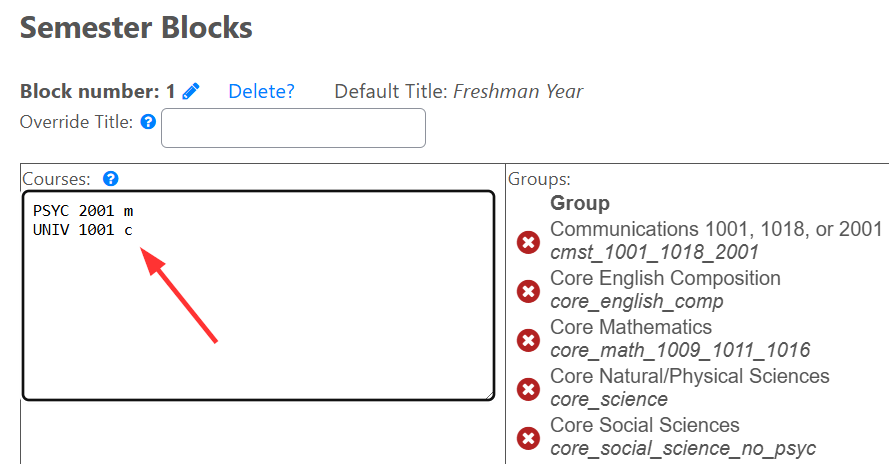
In this example:
midentifies PSYC 2001 as a Major Requirement.cidentifies UNIV 1001 as a Core Requirement.
If no requirement type is specified, FlightPath assigns the course the default requirement type of m.
How Requirement Types Appear#
Requirement types control how courses are displayed in a student’s degree plan.
They are used by the Display by Type view to organize courses into categories. For example:
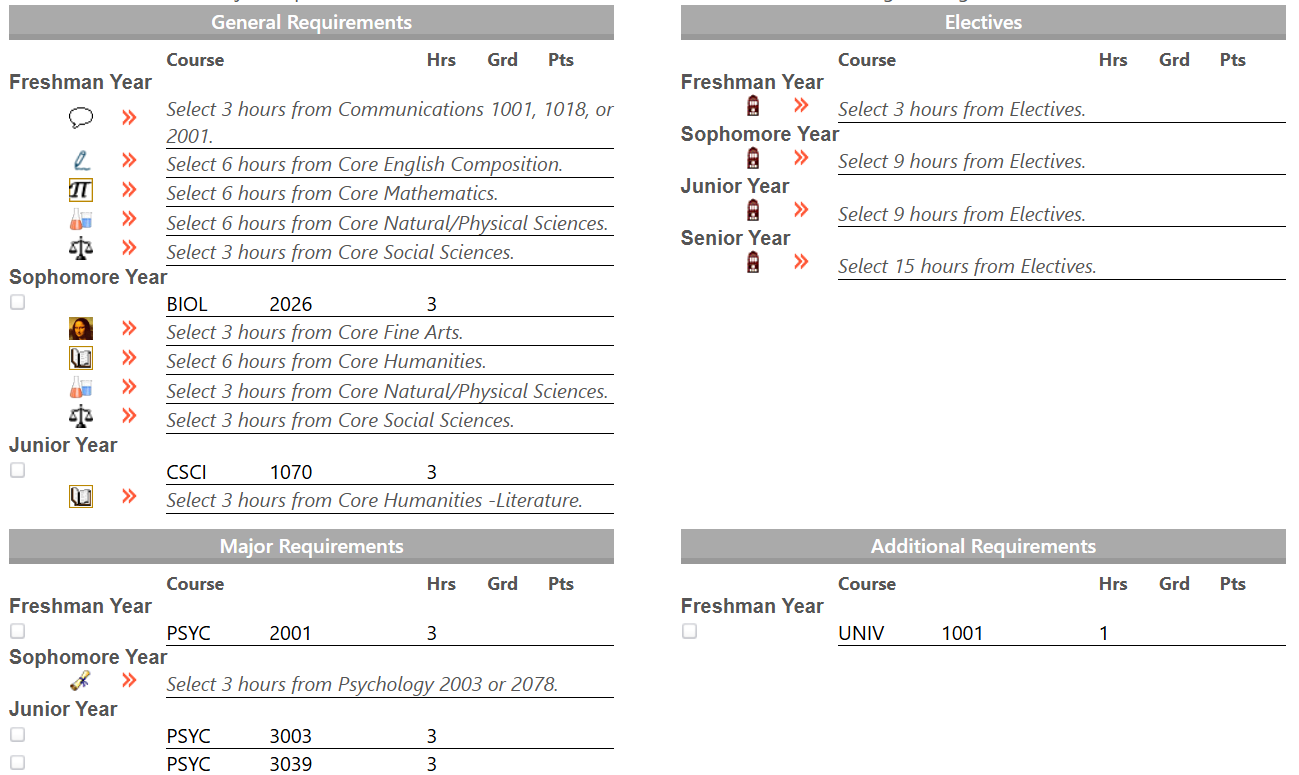
Requirement types also affect how values are calculated and displayed in the degree audit’s pie charts.
Defining Requirement Types#
The available requirement types can be configured from the Configure School Data settings page in the Admin Console.
Requirement types should be entered one per line using the following format:
CODE ~ DESCRIPTION
For example:
m ~ Major Requirement
c ~ Core Requirement
e ~ Elective
g ~ General Requirement
The code should normally be a single lowercase letter.
Special Requirement Type Codes#
Several requirement type codes have special meanings in FlightPath and should be configured carefully.
m — Default Requirement Type#
The m code is the default requirement type assigned to courses when no other type is specified.
The m code should therefore be defined in the requirement types configuration.
For example:
m ~ Major Requirement
e — Unknown / Elective Course Code#
The e code is assigned to a course when FlightPath cannot determine the course code, such as when a course code contains a typo.
This is a catch-all requirement type and should be defined in the requirement types configuration.
For example:
e ~ Elective
x — Excluded From GPA Calculations#
The x code is used for courses that should not be considered in GPA calculations.
FlightPath automatically assigns this code to courses included in the Ignore Courses From Hour Counts setting.
The x code should therefore be defined in the requirement types configuration.
For example:
x ~ Excluded
u — University Capstone#
This special code used to identify a University Capstone requirement while also assigning the course another requirement type.
The letter u cannot be used as a normal requirement type code by itself, but rather it is joined with other codes.
For example:
um
uc
In these examples:
umidentifies the course as a University Capstone and gives it themrequirement type.ucidentifies the course as a University Capstone and gives it thecrequirement type.
The course will therefore appear with the appropriate requirement type while also displaying the University Capstone icon.
Recommended Conventions#
By convention, requirement type codes should:
- Use a single letter.
- Use lowercase letters.
- Have a clear and consistent meaning within your institution.
Before changing requirement types, consider how the codes will affect the way courses are displayed in degree audits and how they are represented in GPA and degree-progress calculations.