Term ID Structure#
Every course taken by a student must have a corresponding term ID that identifies when the course was taken.
For many schools, a term ID is a simple code that combines a year and a term code. For example:
2008SPmight represent Spring 2008.2009FLmight represent Fall 2009.
Each school may have its own system for representing terms. FlightPath can be configured to understand the school’s term ID structure and display terms appropriately.
Configuring the Term ID Structure#
The term ID structure is configured in the Structure of term IDs field on the Configure School Settings page in the Admin Console.
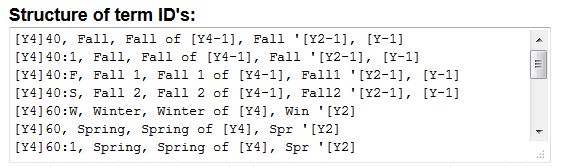
Each line in this field defines one term structure and follows this format:
TERM STRUCTURE, SHORT DESC, LONG DESC, ABBR DESC, YEAR ADJUST
For example:
[Y4]40, Fall, Fall of [Y4-1], Fall '[Y2-1], [Y-1]
The five values are:
| Value | Description |
|---|---|
TERM STRUCTURE | The term structure as it is stored in the database. |
SHORT DESC | A short description of the term. |
LONG DESC | The full description of the term. |
ABBR DESC | An abbreviated description of the term. |
YEAR ADJUST | An optional adjustment to the year when the term is displayed. |
Year Codes#
The following codes can be used when defining term structures.
[Y4]#
The full four-digit year.
For example:
[Y4]
If the year is 2027, this becomes 2027.
[Y4-1]#
The four-digit year minus one.
For example:
[Y4-1]
If the year is 2027, this becomes 2026.
This is useful when the year portion of a school’s term ID is ahead of the actual calendar year.
[Y4+1]#
The four-digit year plus one.
For example:
[Y4+1]
If the year is 2027, this becomes 2028.
[Y2]#
The last two digits of the year.
For example:
[Y2]
If the year is 1998, this becomes 98.
[Y2-1]#
The last two digits of the year minus one.
[Y2+1]#
The last two digits of the year plus one.
Year Adjustment#
The [Y-1] and [Y+1] codes are used only in the YEAR ADJUST portion of the term structure.
[Y-1]#
Subtracts one from the year when displaying the term.
For example, if a term ID uses a year that is one year ahead of the actual calendar year, [Y-1] can be used to display the correct year.
You may also use [Y] for the default behavior, or leave the year adjustment blank when no adjustment is needed.
[Y+1]#
Adds one to the year when displaying the term.
This is used when the year needs to be incremented when displayed.
Example#
Consider the following term structure:
[Y4]60, Spring, Spring of [Y4], Spr '[Y2]
If FlightPath receives the term ID:
202760
it can display the term in several ways depending on which description is requested:
- Short: Spring
- Long: Spring of 2027
- Abbreviated: Spr ‘27
The term structure therefore allows FlightPath to translate the codes stored in the database into readable term descriptions.
When the Database Year Is Different From the Calendar Year#
Some institutions use term IDs where the year represented in the database does not correspond directly to the calendar year in which the term occurs.
For example, a school might represent Fall 2010 in its student information system as:
201140
In this case, the 2011 portion of the term ID is actually referring to Fall 2010.
The term structure can account for this by subtracting one from the year when the term is displayed.
For example:
[Y4]40, Fall, Fall of [Y4-1], Fall '[Y2-1], [Y-1]
With this structure, FlightPath can recognize a term such as 201140 and display it as Fall 2010.
This type of year adjustment is used by some real-world student information systems.
Term IDs Must Sort Chronologically#
It is very important that term IDs stored in the FlightPath database, or imported from an external system, sort in the correct chronological order.
For example:
201040
must sort before:
201060
FlightPath uses this ordering when determining which courses should fill into the degree plan first.
If term IDs do not sort chronologically, courses may be applied to a student’s degree plan in the wrong order.
If your school’s term IDs cannot be made to sort correctly, you have several options:
- Adjust the term IDs before they are loaded into FlightPath.
- Create a FlightPath-specific term ID system when importing courses.
- Override the course sorting functions in the
CourseListobject.
The term IDs used by FlightPath therefore need to satisfy both requirements:
- FlightPath must be able to interpret the term ID correctly for display.
- The term ID must sort correctly relative to other term IDs.
Part-of-Term Codes#
If your institution uses the “part of term” codes (common in Banner schools), you must place a colon in the term structure, which separates the term code from the part-of-term.
For example:
[Y4]40:F
This uses the part-of-term code to create a distinct term code in FlightPath.
If your institution does not use part-of-term codes, this does not apply.
When a Term System Cannot Be Represented#
Most term ID systems can be represented using the structure described above.
If your school’s term code system is sufficiently different that it cannot be represented using these structures, you will need to create a pseudo-term system specifically for FlightPath when importing student courses.
The FlightPath-specific term IDs should still follow the chronological sorting requirement described above.